

As a faculty member teaching online, you may have received a Dell monitor to assist with your Zoom classroom.
This monitor is a Dell E2720HS and information on this device can be found online at Dell’s support site: https://www.dell.com/support/article/en-us/sln320306/dell-e2720hs-monitor-usage-and-troubleshooting-guide?lang=en
Specific information on how to manage the volume control on this monitor is contained in the instructions below that cover the On Screen Display menu.
Using the On-Screen Display (OSD) Menu
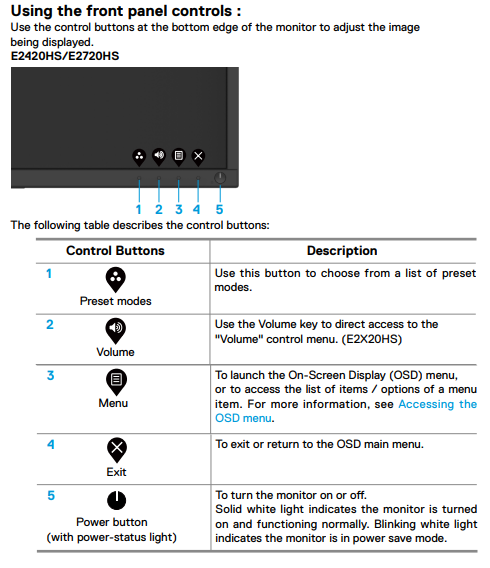
Use the buttons at the bottom of the monitor to access the On-Screen Display (OSD) menu of the monitor. To access the On-Screen Display (OSD) menu, press Button 5 (Figure 1) at the bottom of the monitor.
To learn more about how to use the On-Screen Display (OSD) menu, refer to the Operating Your Monitor section in the User’s Guide of Dell E2720HS monitor.

Figure 1: Dell E2720HS Front Panel Buttons
| BUTTON | FUNCTION | DESCRIPTION |
|---|---|---|
| Button 1 | Shortcut key/Preset Modes | Use this button to choose from a list of preset color modes |
| Button 2 | Shortcut key/Brightness/Contrast | Use this button to adjust the brightness and contrast. Minimum is ‘0’ (-). Maximum is ‘100’ (+) |
| Button 3 | Menu | Use the MENU button to launch the On-Screen Display (OSD) |
| Button 4 | Exit | Use this button to exit the OSD main menu |
| Button 5 | Power On/Off button (with LED indicator) | A solid white light indicates the monitor is On and fully functional. Blinking white light indicates the power save mode |

Figure 2: Dell E2720HS OSD Controls
| BUTTON | FUNCTION | DESCRIPTION |
|---|---|---|
| Button 1 | Up | Use the Up button to increase values or move up in a menu |
| Button 2 | Down | Use the Down button to decrease values or move down in a menu |
| Button 3 | OK | Use the OK button to confirm your selection in a menu |
| Button 4 | Back | Use the Back button to go back to the previous menu |