

For information on how to enable closed captions for your meeting/class/event as a host please see this page.
Desktop Client
- Sign in to the Zoom desktop client.
- Join a meeting or webinar.
- When closed captioning beings, you will see a notification above Closed Caption in the meeting controls.
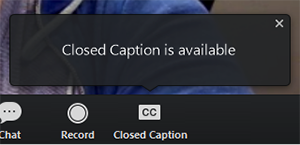
4. Click Closed Caption to start viewing closed captioning. Tip: Click and drag the closed captioning to move its position in the meeting window.
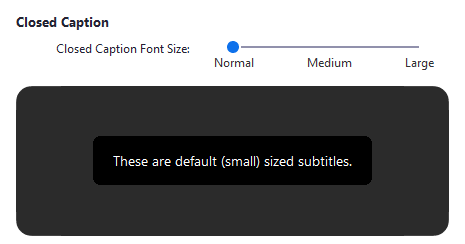
(Optional) To adjust the caption size:
- Click the upward arrow next to Start Video/ Stop Video.
- Click Video Settings the Accessibility.
- Move the slider to adjust the caption size.
Mobile Application
- Sign in to the Zoom mobile app
- Tap the Settings icon.

3. Tap Meeting.
4. Toggle Closed Captioning to on. When you are in a meeting where closed captioning is available, they will automatically appear on the bottom of the screen.
Pulled from Zoom's support page: https://support.zoom.us/hc/en-us/articles/207279736-Managing-and-viewing-closed-captioning
If you have any questions, please feel free to contact Technology Services at lawtech@pepperdine.edu or (310) 506-7425.