Skip to content
csol lawtech
  • Classrooms
    • Classroom Overview
    • Caruso Auditorium Classroom C
    • Caruso Auditorium Classroom D
    • Caruso Auditorium Classroom E
    • Mendenhall Appellate Courtroom
    • Classroom A (Salathe Classroom)
    • Classroom B (Irvine Lecture Hall)
    • Classroom F
    • Classroom G
    • Seminar Room 1
    • Seminar Room 2
    • Seminar Room 3
    • Seminar Room 4
    • Seminar Room 5
    • Darling Trial Courtroom
    • Jury Room
  • Faculty
  • Students
  • Staff
  • About Us

Login to Panopto with your WaveNet Credentials

David Dickens

Jan 30, 2018
Tags :Account Access, Panopto, Single Sign-On, Wavenet

If you’ve ever had to miss class before, then you may have asked the professor to have the session recorded via Panopto. You then received a viewing link to view the recording and all you had to do was click on the link and Presto! the recording appeared. Only one small issue with that… a little thing called “security”.

In an effort to ensure a more secure environment for all class recordings, the Panopto service has now moved to an online authentication that prompts you to log into the service with your Pepperdine WaveNet credentials.

This means that when you get a viewing link now, you may have to “login” before you can view the session. This is super easy as long as you have a current Pepperdine network ID. All you have to do is follow the 3 steps listed below to login and “Viola” you’re watching your riveting class recording in no time!

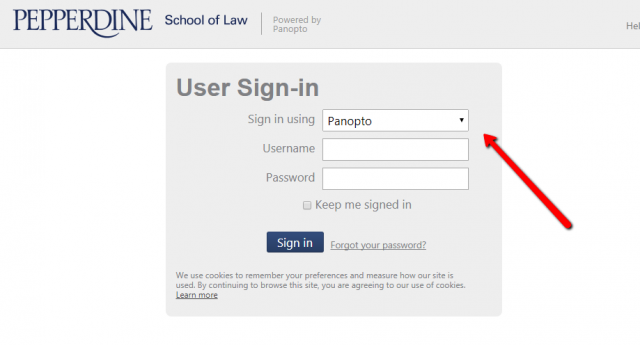
1. Select the drop-down menu for the “Sign-in using” box.


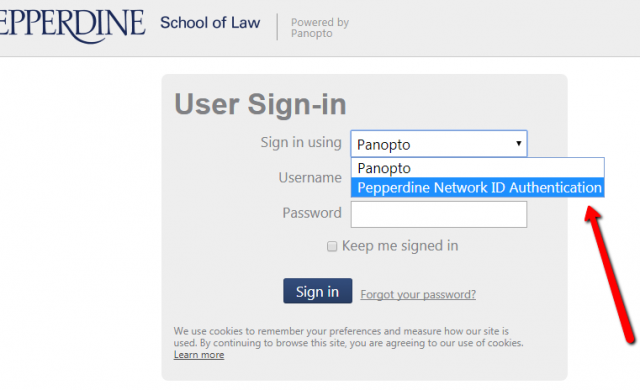
2. Choose the “Pepperdine Network ID” option.


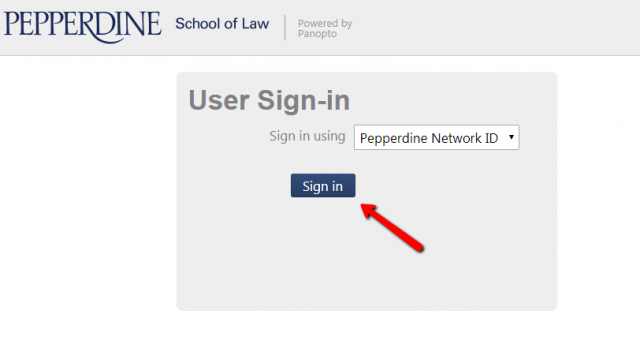
3. Then choose “Sign In” and sign in through the Pepperdine Portal to be connected.

←Previous: Examplify exam-day tips: restart, quit Spotify, close other apps
Next: Pepperdine Passwords and Password Managers→

Recent Posts

  • ExamSoft Examplify at Caruso Law (overview)
    by David Dickens
  • Bar exam laptop readiness (California / Examplify)
    by David Dickens
  • Register for WiFi Network Access
    by Ananya Srivastava
  • Microsoft Account Error Fixes
    by Angela Salazar
  • Wifi Tips: Turning Off Private Browsing MAC
    by David Dickens
  • Hosting School of Law Events
    by Ananya Srivastava
  • Troubleshooting Tips
    by Ananya Srivastava
  • Choosing Zoom Mic/Camera, Troubleshooting, and Add-Ons
    by David Dickens
  • Tech Help
    by Ananya Srivastava
  • Extended Desktops
    by Angela Salazar

Not finding what you are looking for? Additional resources found at community.pepperdine.edu

Explore More
About Us

Pepperdine University’s Caruso School of Law is located in Malibu, CA.

    Additional Links
    • Pepperdine Community
    • Caruso School of Law
    • Pepperdine University
    Contact

    (310) 506-6417
    LawTech@pepperdine.edu