

If Examplify stops around halfway with “The Application’s Service is Unavailable” on Windows, try these fixes before exam start. (On a Mac, follow ExamSoft’s Application Service Unavailable (Mac) steps.)
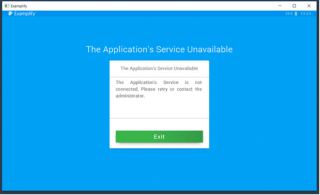
- Right-click the Examplify shortcut → Run as administrator.
- If it still fails: open Services (Start menu search), find ExamplifyService (or other ExamSoft/Examplify-related services), and ensure they are running. Double-click the service, set Startup Type to Automatic, and click Start.


- Reboot, temporarily disable antivirus (see ExamSoft’s Disable Your Antivirus Software), then try again.
- If it still fails, uninstall Examplify, then download and reinstall it from the Caruso Law ExamSoft portal.
- If you are in the exam room and still blocked, tell the proctor immediately and contact LawTech.
ExamSoft guidance: Application Service Unavailable (Windows) · Application Service Unavailable (Mac).
Screenshots are from an earlier Examplify version; your screens may look slightly different.
Questions? Contact Technology Services at lawtech@pepperdine.edu or (310) 506-6417 (Public Services Desk, Harnish Law Library).